
A day plan for one-person businesses and the AI agents that work for them.
Tasks, a calendar and reminders on your phone, your Mac and your Linux desktop, offline first. Your agents plan and finish work over MCP or the command line and ask you before a risky step, on a server you run yourself.
- Free, with no paid plan
- No account with us
- Your data stays with you


One plan on every screen
Your phone, your Mac, your Linux desktop and your terminal show the same plan. Each keeps its own copy, works offline and catches up when your server can be reached.


- Android
- Today, the week and day calendar, the board, repeats, checklists, reminders and approvals. Starts without any server.
- macOS
- Today, quick add from the menu bar or a global shortcut, reminders, the morning summary, the trash and each task's history.
- Linux
- A Qt 6 app with Today, a quick add window for a key binding, a tray icon and desktop notifications. Follows Omarchy themes.
- Terminal
dayhand uishows Today, the board, the week and the trash full screen, with vim-style keys, in your terminal's colours.- iPhone and iPad In the works
- Not out yet, so there is nothing to install or test. Until then the plan is on Android, macOS, Linux and the terminal.
$ dayhand
Today, Sat 24 Oct 2026 (Europe/London)
NOW  #7 Write the proposal for the bakery website
     next: The pricing table is next
OVERDUE (1)
  #6   [ ]  yesterday  Send the October invoices                  #billing
TODAY
  #8   [ ]  09:30      Review the agent's pull request #18        #dev 1/3
  #9   [ ]  11:00      Call the accountant about VAT              #admin
  #11  [~]  16:00      Update the pricing page                    #site
  #12  [ ]  17:00      Publish the October newsletter             #marketing
  #7   [~]             Write the proposal for the bakery website  #clients now
  #13  [ ]             Back up the server                         #ops ↻
  #14  [ ]             Answer the support emails                  #support
  #20  [~]             Write the case study for the logo project  #marketing 2/3
DONE (1)
#10 [x] 12:00 Export the Q3 sales report #billingdayhand alone prints Today.
The apps and dayhand ui speak English, Polish, German, Spanish, French, Brazilian Portuguese, Japanese
and Simplified Chinese.
Built for agents, with you in charge
Any MCP client, or any agent that can run a command, works on the same plan you do. Here is one made-up day of that work.
Say what done means
Give a task acceptance criteria, a plan and a note before the work starts. The agent reads them over MCP or
with dayhand show, ticks each criterion as it meets it and leaves the note where it stopped.
$ dayhand show 12
#12 Publish the October newsletter
status   todo
due      2026-10-24 17:00 (today)
labels   marketing
claimed  claude until 2026-10-24 19:01
id       m97akk9x3n5fd3j4fbdva7jf818gxt1v
acceptance:
  1. [x] Every link opens
  2. [x] The unsubscribe link works
  3. [ ] You approved the final text
plan:
  Draft it from this month's notes, check every link, then ask before sending
note:
The draft is in newsletter-october.md.dayhand show prints it; the change history that follows is cut here.-
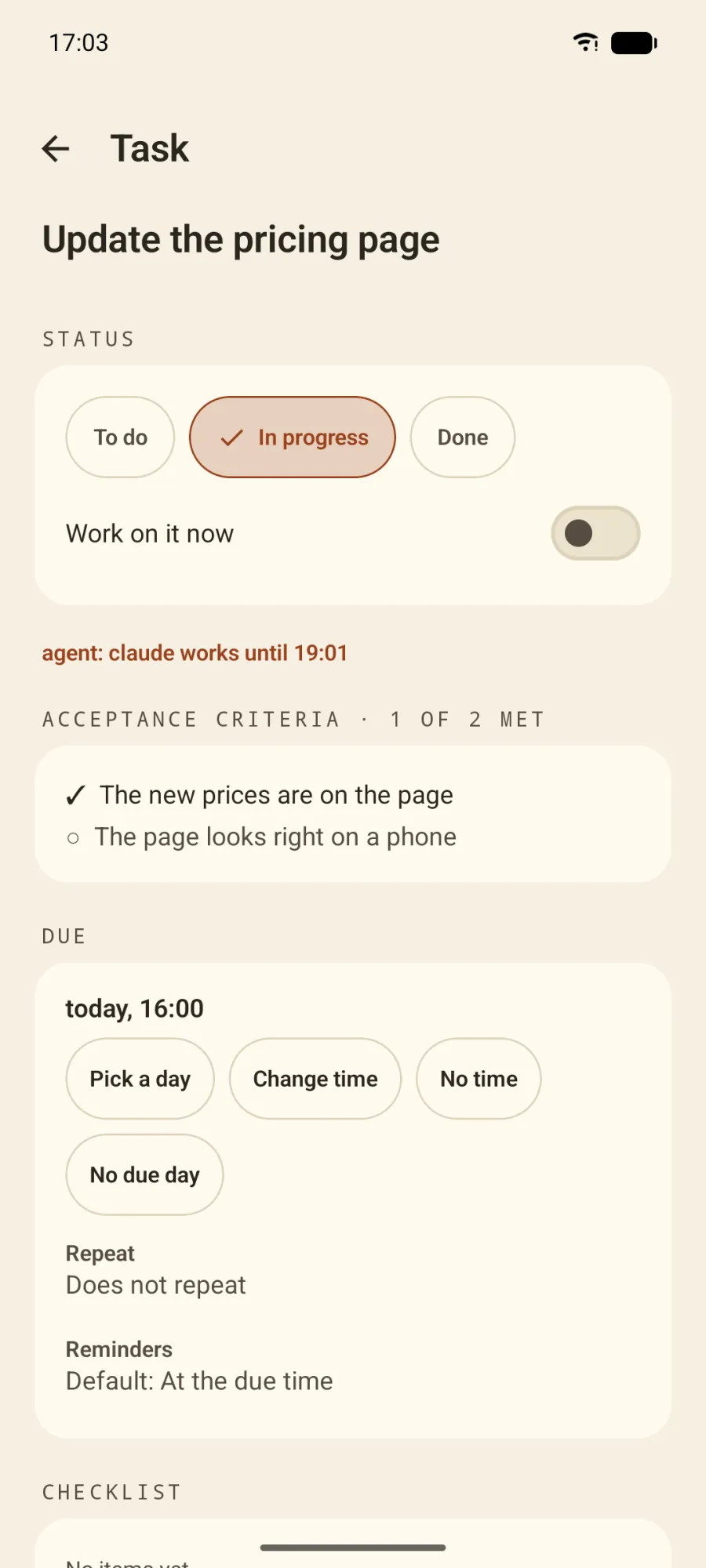
Claim. claude holds this task until 19:01, so no other agent can change it. When the time runs out, anyone may take it; your own changes always go through. -
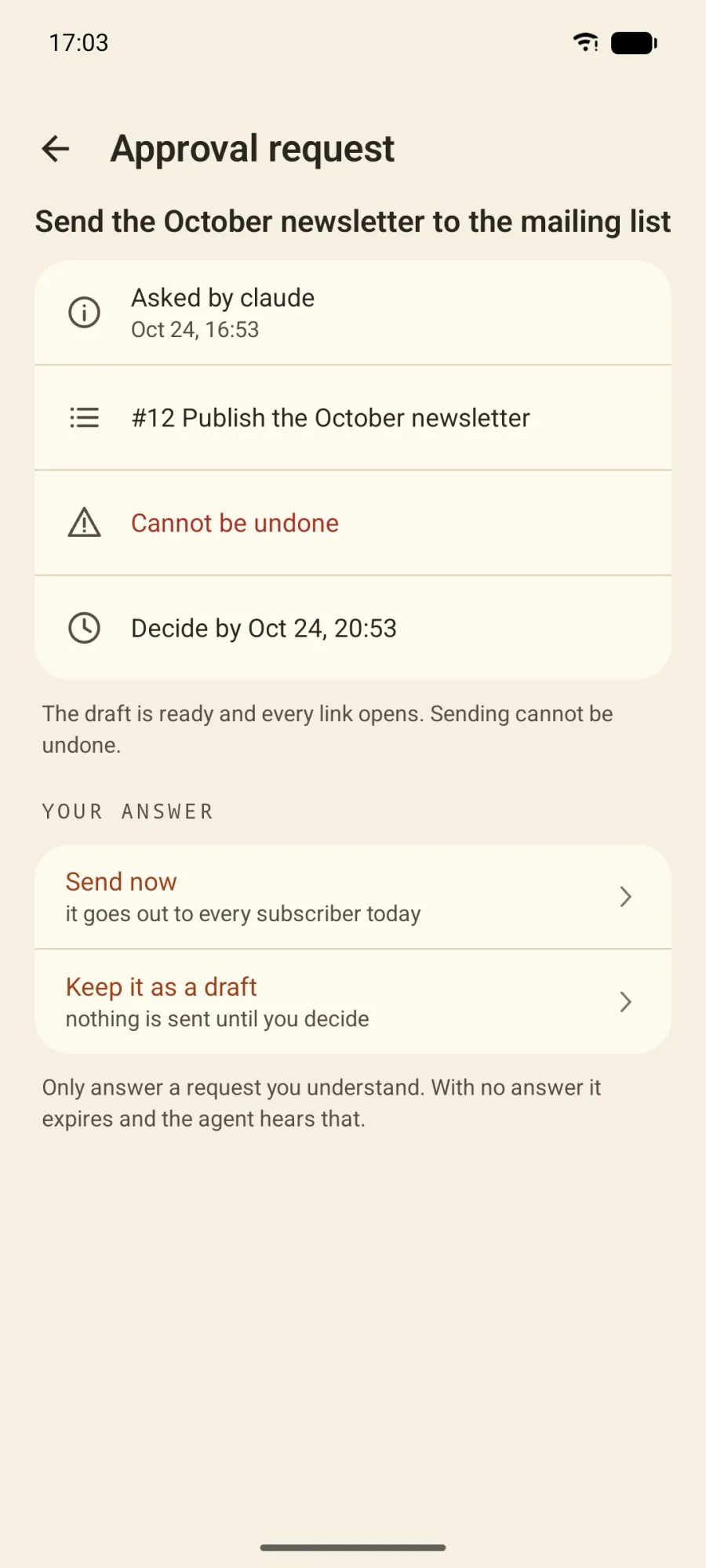
Ask. Before a step that cannot be undone, the agent asks and waits. You pick an answer; with none by the deadline, the request expires and the agent is told. -
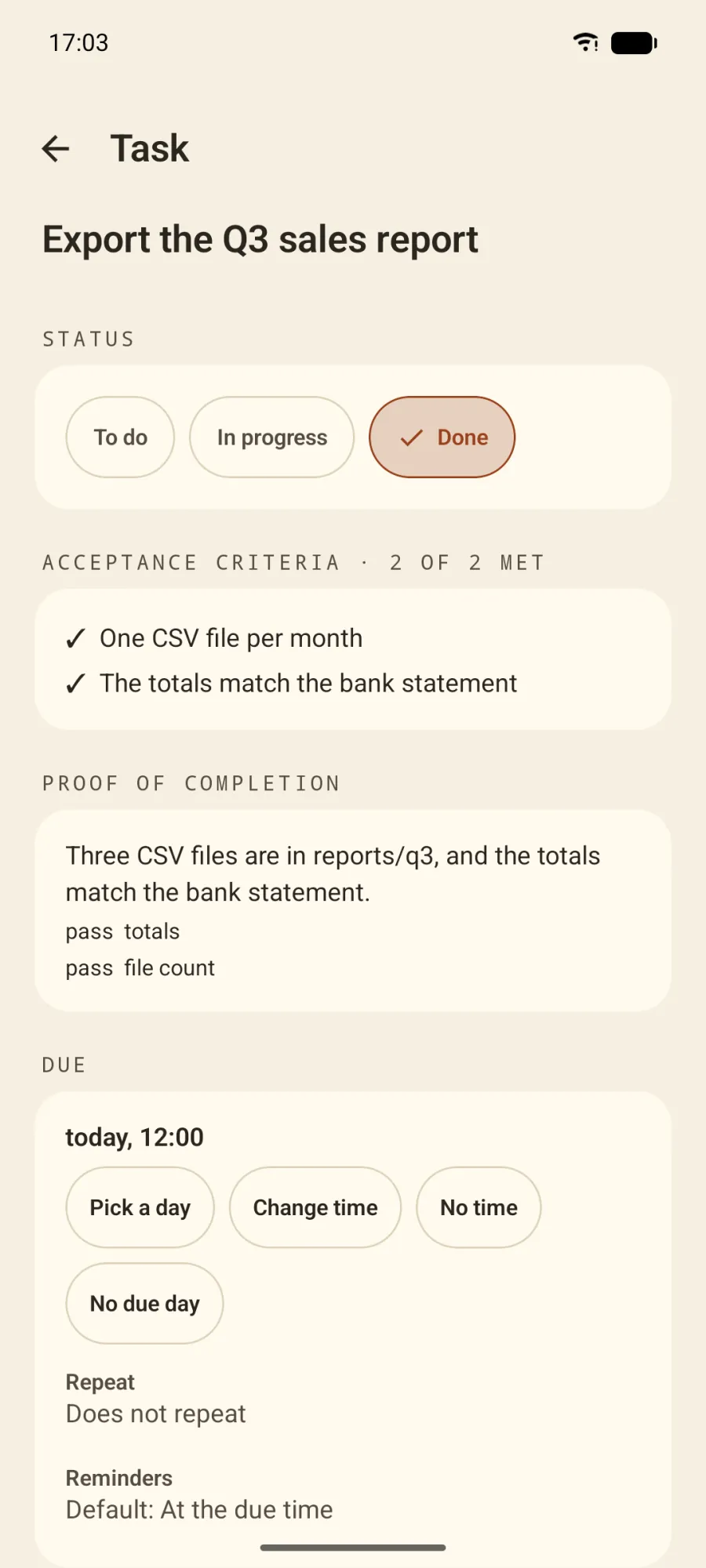
Prove. A task with criteria is done only when they are met and the agent says what it did, with named checks such as totals=pass.


You set the rules
One switch pauses every agent. A policy for each agent key allows, asks for or denies each tool, and work an agent proposes waits in an inbox until you accept, merge or reject it. A health card above Today shows what needs a look.
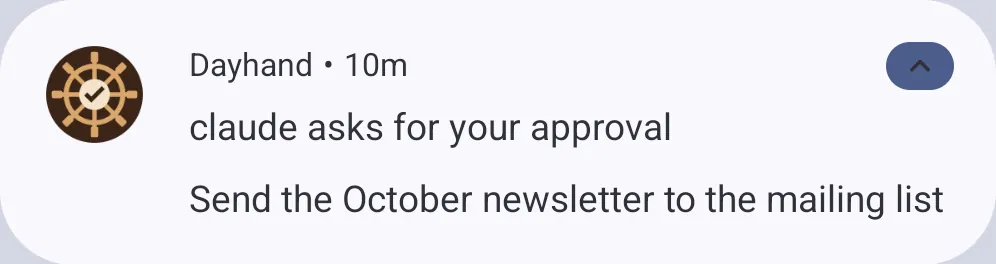
The phone checks for new approval requests about every 15 minutes and shows them as a notification. Dayhand uses no push service, so nothing sits between your server and your phone.

See who did what
Every person and every agent key signs its changes, so an agent's edits stand out in the task history and the
activity log, and dayhand log --by agent lists them in the terminal. Revoke a key and that agent
is out.

Connect an agent
The server speaks MCP at /mcp. Any MCP client connects with the address and an
Authorization: Bearer header; for Claude Code it is one command. The Claude apps connect as a custom
connector with OAuth, and you approve each connection on your phone.
Agents that run shell commands use dayhand. With --json it prints exactly what the MCP
tools return, and a ready Agent Skill teaches an agent the commands.
AGENT_KEY=$(dayhand key create claude --scope write --json | jq -r .key)
claude mcp add --transport http dayhand http://127.0.0.1:3211/mcp \
  --header "Authorization: Bearer $AGENT_KEY"
Dayhand records your decisions and the agents' work in the plan. It cannot stop what an agent does outside Dayhand.
Your plan, on your own server
There is no Dayhand cloud and no server address built into the apps. You run the server, with one command, or skip it: the apps also work on their own.
-
Start a server on this computer
On macOS or Linux, with the
dayhandcommand from Download, which carries the server code (backend/), so there is no repository to clone. The first run downloads the Convex local backend once, signsdayhandin and prints a pairing code. Data and keys stay in a private folder.dayhand server start -
Connect your phone
In the app, choose Settings, Server, Connect to my server, and scan the code. Release builds connect only over HTTPS, so a server on your computer needs
tailscale servein front of it.dayhand pair -
Or use your own Convex account
This deploys to your free Convex account and gives a public HTTPS address, which the Claude apps and a phone away from home need. It works from Windows too, and the Free plan costs nothing.
dayhand server deploy
No server at all? The Android app starts with an empty plan or sample data and keeps everything on the phone. Android backups are off for Dayhand, so keep a backup file. Costs, backups, updates and Tailscale: the deployment guide.
Download
Pre-release The apps have no published release yet: they build from the source today, and ready-made downloads are marked Coming soon.
-
Command line
npm and Homebrew One command puts
dayhandanddh(the same command, shorter) on your PATH:npm i -g dayhandOr run it once without installing:
npx dayhandWith Homebrew, on macOS and Linux:
brew install maiarowsky/tap/dayhandThe package carries the server too:
dayhand server startruns your own, with no copy of the repository, as the deployment guide shows. -
Android
Works today Build the app yourself
Coming soon A signed APK on GitHub Releases
Coming soon Google Play
-
macOS
Works today From the source:
(cd macos && scripts/build-app.sh)
open macos/dist/Dayhand.app
Coming soon A signed download
-
Linux
Works today From the source:
(cd packaging/arch && makepkg -si)Other distributions build with CMake, as the Linux guide shows. Not on the AUR.
-
iPhone and iPad
In the works Not out yet: there is no app to install and no beta to join.
It will use the same server and the same plan as the other apps.
The build commands for the apps run in a copy of the repository; the install guide shows how to get one and what each app needs.
Free and open source
Dayhand is licensed under the Apache License 2.0. The apps, the server, the command line, the documentation and this site live in one public repository, github.com/maiarowsky/dayhand, and you may use them for your business, change them and share them.
There is no paid plan and no hosted service, and no account to create. There is nothing to sell you and nothing that only paying users get.
Contributions are accepted under the Developer Certificate of Origin (how to contribute). Security problems go privately, never in an issue (security policy).
The Convex local backend that dayhand server start downloads on macOS and Linux is not part of
Dayhand: it is source-available under FSL-1.1-Apache-2.0, fetched at a pinned version with a verified checksum.
Questions
Is Dayhand really free?
Yes. Every app, the server and the command line are free, with no paid plan and no trial. A server on your computer costs nothing, and so does a server on Convex's Free plan; its limits are in the deployment guide.
Why is it free?
Dayhand is a personal project with no hosted service, so there is nothing to bill for. It is shared under the Apache License 2.0, and support is what the issues on GitHub offer: bugs you can reproduce and ideas, with no promise of a reply time.
Do I need an account?
Not with us; there is no Dayhand account. A server on your computer needs no account. To reach it from your
phone you put Tailscale in front of it, which has its own sign-in, and dayhand server deploy asks
you to log in to your own Convex account.
Where does my data live?
On your devices and on the server you chose: your computer or your own Convex account. Each app keeps a copy for working offline. Nothing goes to us, because there is no server of ours to send it to.
Which agents can use it?
Any MCP client, with the server address and an Authorization: Bearer header; Claude Code is one
command. The Claude apps connect as a custom connector with OAuth, which you approve on the phone. Agents that
run shell commands can use dayhand, and a ready Agent Skill teaches them how.
Can an agent do something I did not allow?
Inside Dayhand, a policy per agent key allows, asks for or denies each tool, risky steps wait for your answer, and one switch pauses every agent. Dayhand cannot stop what an agent does outside Dayhand.
Does it work offline?
Yes. The Android, macOS and Linux apps keep the plan on the device and send changes to the server, in order, when it can be reached.
Is there an app for iPhone or Windows?
The iPhone app is in the works and not out yet. On Windows, the dayhand command line works with
a server on your own Convex account; there is no desktop app.
When can I download a ready-made app?
The apps have no published release yet and there is no date. The signed Android build is prepared; until it is out, the apps build from the source as shown under Download, beside the commands that install the command line.
Can I see my tasks in Google Calendar?
Yes, through a read-only calendar feed that any calendar app can subscribe to. Changes are made in Dayhand.
Why do some names still say helm?
Dayhand was called Helm until backend 0.9.0 and CLI 0.10.0, and the repository moved from
maiarowsky/helm to maiarowsky/dayhand; old links redirect. The old hlm
command still works with a warning, and a few names stored in data stay as they were:
what changed.
Where is the full documentation?
In the documentation: installing, the command line, MCP, the REST API, webhooks, the calendar feed and running your own server.
Plan the day with a spare pair of hands.
Free and open source, on your own server.